Ten styles, one motion · the workflow
Numa made this reel by itself
You commented NUMA, so here is how it happened. We gave Numa one message, our earlier reel and five style pictures. Numa analysed the reel, wrote every prompt, made the pictures, ran the video model on our own PC and cut the result. Nobody built a pipeline.
- 1 message to Numa
- 10 styles
- 25.6 seconds
- video made on our own PC
Want the same? Let Numa do it
You do not need to learn any of the prompts below. Numa is a desktop agent: you say what you want and it does the work on your computer.
Get Numa and open a folder
Download Numa for Mac or Windows, make a new folder and open it in Numa. Drop in a picture of your character and the looks you like.
Get Numa at numa.animiste.comShare the reel and say what you want
Give Numa the link of a reel you like. Ours works. Numa watches it, takes it apart and plans your version. This is our own message, cleaned up. Change the words in brackets.
Here is a reel I like: [link to the reel]

Make my version of it with my character (character.png in this folder), in the styles of the pictures I attached.

One continuous action through the whole reel: [my character bends down, lifts a small bunny, hugs it and pets it].

Make the pictures with image generation, then make the clips with the video model on my PC.
Tell it what to fix
The first version is never perfect. Ours was not. Say what is wrong in the chat, in your own words, like "the bunny hides the eye in the fourth style" or "the look should change faster". Numa remakes that part and keeps the rest.
Connect your accounts and Numa also schedules the reel for you. Nothing goes out before you say yes.
Under the hood
This part is for the curious, and for anyone who wants to do it by hand. The whole method is two local steps, repeated: a picture model draws the first frame of a look, then a video model moves it. The video model is open and ran on our own PC, so there is no fee per clip and no cloud queue.
One action runs through the whole reel: Numa bends down, lifts the bunny, hugs it and pets it. The look changes ten times, the motion never starts over. That works because of one rule: the first picture of each style is made from the last frame of the clip before it. At every cut only the look changes.
The picture prompt
These are the rules Numa's picture prompts follow. Used as a system prompt for a picture model, they keep the character the same in all ten looks. We used the image generation inside Numa. A local picture model works too: an earlier opening picture came from MiniMax H3 Image on our PC.
You redraw one frame in a new visual style. You get three pictures.
Picture 1: the character.
Picture 2: the last frame of the clip before (the pose to keep).
Picture 3: the style.

Rules:
1. Keep the character's shape exactly. [Describe it in plain words: body shape, colour, eyes, arms, legs. Say what it does NOT have: no mouth, no nose, no ears.]
2. Keep the pose, the framing and where everything stands from Picture 2. Nothing moves. Only the look changes.
3. Take only the material, the light and the feel from Picture 3. None of its characters, faces or features.
4. Name the material in real words: fleece with seams and stitching, plasticine with thumb prints, cut paper on a cardboard stand.
5. The character is seen whole, from head to feet.
6. No text, no logo, no extra characters.
For the very first style there is no frame before it, so the prompt describes the scene too. This is one of our real prompts for the opening picture, word for word:
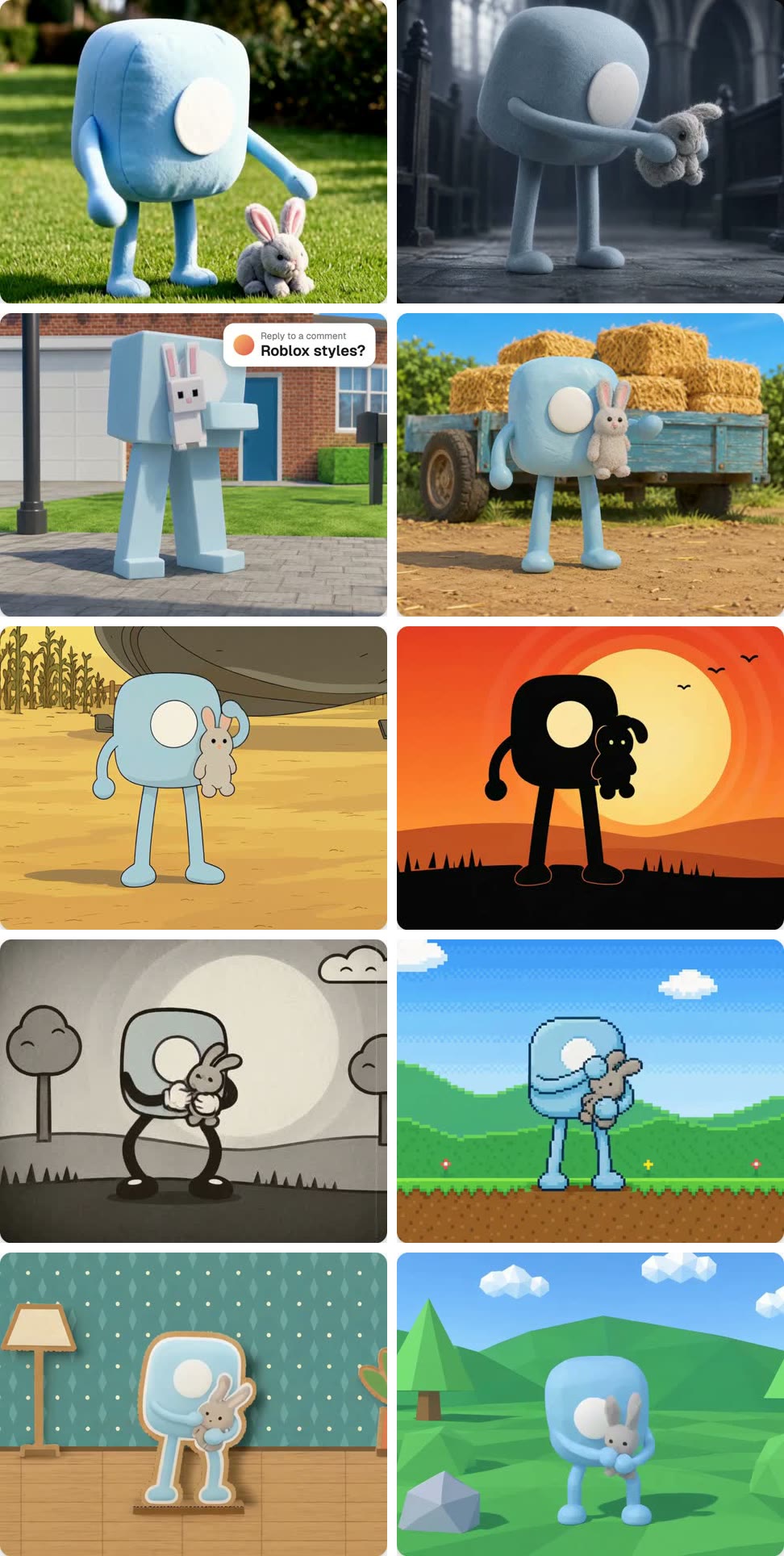
A live-action photograph, filmed like a children's TV show on a real sunny lawn. A person-sized walk-around plush costume of the character in the first reference picture: the SAME shape exactly: a big soft rounded-square body (like a pillow cube with rounded corners), light powder blue fleece (#b9d8e3), ONE single large round white felt eye in the middle of the front, absolutely no mouth, no nose, no ears, no second eye, nothing on the head. Thin padded fleece tube arms ending in small round ball hands, and two thin padded tube legs ending in small rounded bean-shaped feet. Real fleece fabric with soft pile, slight seams, real stitching.
Beside its feet on the grass sits a small real-looking plush bunny toy: soft fluffy light grey fur, long upright ears with pale pink insides, a round chubby body, small black bead eyes, a tiny pink nose.
Setting: a real bright green lawn in natural afternoon sunlight, soft real shadows on the grass, a blurred garden hedge and trees in the background, shallow depth of field, photographic, 35mm film look, the costume seen whole from head to feet, standing slightly left of centre, the bunny on the grass to its right. Only the light and photographic feel of the second reference picture; none of its character, face or features.
No text, no logo, no people visible outside the costume.
The video prompt
Each picture becomes one short clip. We used the first-frame-to-video model, so the clip starts exactly on your picture.
| Setting | What we used |
|---|---|
| Model | MiniMax H3, first-frame-to-video, Q4 GGUF file |
| Runner | stable-diffusion.cpp (sd-cli), CUDA build |
| Size | 736 x 576 |
| Length | 22 frames at 12 frames a second |
| Steps | 12 |
Every motion prompt has the same four parts, in this order: the style, one small piece of the action, the shape lock, and the camera line. These are real ones from the reel:
Gothic stop-motion puppet animation in a misty church aisle, cold blue-grey light, haze, static camera. The pale blue-grey puppet with one big round white eye and no mouth, bent forward holding the small grey yarn bunny in its two round hands, slowly straightens its body upright and lifts the bunny up to the height of its chest. The bunny kicks its little hind legs once and its long ears bounce. Handmade stop-motion movement, slightly stepped. The puppet keeps exactly its shape: rounded-square body, one white eye, thin noodle arms and legs. The camera does not move.
Blocky online-game animation, glossy game render, bright daylight in front of a red-brick suburban house, static camera. The blue cube-bodied avatar with one big flat white eye and no mouth holds the small white blocky bunny out to its right in one block hand. It brings the bunny in toward its body and hugs it against the front of its cube body, both stiff block arms closing around the bunny, with a simple game-character idle bounce. The bunny's block ears wiggle. Stiff, simple game-like motion. The avatar keeps exactly its shape: cube body, one white eye, block arms and block legs. The camera does not move.
1930s rubber hose cartoon animation, bouncy. Holding the bunny to its chest, the character sways its whole body from side to side in rhythm while its gloved hand keeps petting the bunny's back; its noodle legs bounce. The bunny snuggles in. Static camera, the camera does not move. The blue character keeps exactly its shape: one big white eye, no mouth, thin noodle arms and legs. The bunny keeps its shape.
16-bit pixel art game animation, choppy sprite frames. Holding the bunny to its chest, the pixel character keeps petting its head with one hand, bobbing a little with joy. The bunny's pixel ears twitch. Static camera, the camera does not move. The blue character keeps exactly its shape: one big white eye, no mouth, thin noodle arms and legs. The bunny keeps its shape.
mouth, second eye, pupils, eyelids, face, text, logo, extra limbs, extra characters, person, morphing, cut, camera shake, blur
What we learned the slow way
- Repeat the shape lock in every prompt. Without it our one-eyed character grew pupils and a mouth.
- Put what must never appear in the negative prompt. For us: mouth, second eye, pupils, eyelids.
- One small action per clip. 22 frames is under two seconds. "Lifts the bunny to its chest" works. "Catches it, hugs it and pets it" does not.
- Keep the camera still. A moving camera breaks the cut to the next style.
- Check every clip. We remade 4 clips that failed our own check.
The chain
Numa repeats this ten times. This loop is the whole method:
Our ten looks, in order: live-action plush, gothic stop-motion, blocky game avatar, farm clay, flat 2D cartoon, ink silhouette, rubber hose, 16-bit pixel, cardboard cutout, 90s low poly.
The cut
Numa put the ten clips in order, trimmed each to between 1.3 and 2.5 seconds, drew the list that types itself, and added the sound. That part is code, not a video model, so the text stays sharp.
If you cut it by hand, any editor works. Two rules: cut on the motion, and never let a clip sit still at its end.
If you run the video model yourself
The local part is heavy. Read this before you download 64 GB.
The PC we used
| Graphics card | RTX 3080 laptop, 16 GB |
| Memory | 32 GB |
| Processor | 8 cores |
| Disk for the model files | about 64 GB |
The files
| File | Size |
|---|---|
| H3 video model, first-frame-to-video (Q4) | 10.6 GB |
| H3 video model, reference-to-video (Q4), optional | 10.6 GB |
| H3 Image model (8-bit) | 19.5 GB |
| Text encoder (Q4) | 17 GB |
| Video, image and audio decoders | 6.6 GB |
What to expect
- Time. About 2 min 40 s for one 22-frame clip, about 1 min 40 s for one picture. The ten styles took 52 minutes.
- Memory. The video model wants about 34 GB for its weights. On our 32 GB machine it reads them from disk as it goes, which works but starts slowly. With less than 32 GB, do not try.
- Heat. Our laptop reached 82 °C and switched itself off once in the middle of a job. Keep it plugged in, on a hard surface, and stop it from going to sleep.
- Small and choppy on purpose. 736 x 576 at 12 frames a second is what fits in 16 GB. Scale the clips up afterwards.
- It drifts. Faces, hands and small details change between clips. A simple character with a strong shape survives. A detailed one will not stay the same.
- No such PC? The method does not need H3. Any video model that starts from a first picture works the same way. Tell Numa which one you have.
- Use your own looks. Name materials and eras, never film titles, shows or characters.
Make your own with Numa
Share a reel, say what you want, and tell it what to fix. Numa does the rest by itself, on your own computer. Mac and Windows.
Get Numa